How to Choose the Best POS System for a Grocery Store
Running a grocery store involves more than selling products. From managing thousands of items to updating prices, tracking stock, and processing payments, every task needs to run smoothly. The right grocery store POS system in Australia can help simplify daily operations, reduce manual work, and give business owners better control over their stores.
However, not every point-of-sale (POS) system offers the same features. Before choosing one, it is important to understand what your grocery store needs and which features will make the biggest difference to your daily operations.
1. Look for Easy Inventory Management
Inventory management is one of the most important features of a grocery store POS system. Grocery stores often manage hundreds or thousands of products, and keeping track of stock manually can take considerable time.
A good POS system should help you monitor stock levels, record stock movements, and identify products that need restocking. This makes it easier to manage inventory and reduce the risk of running out of popular items.
Look for a system that supports:
- Real-time or timely stock updates after sales
- Stock adjustments and stocktaking
- Low-stock monitoring
- Product and category management
- Stock movement and inventory reports
These features help grocery store owners maintain more accurate stock records and make informed purchasing decisions.
2. Choose a POS System With Barcode Scanning
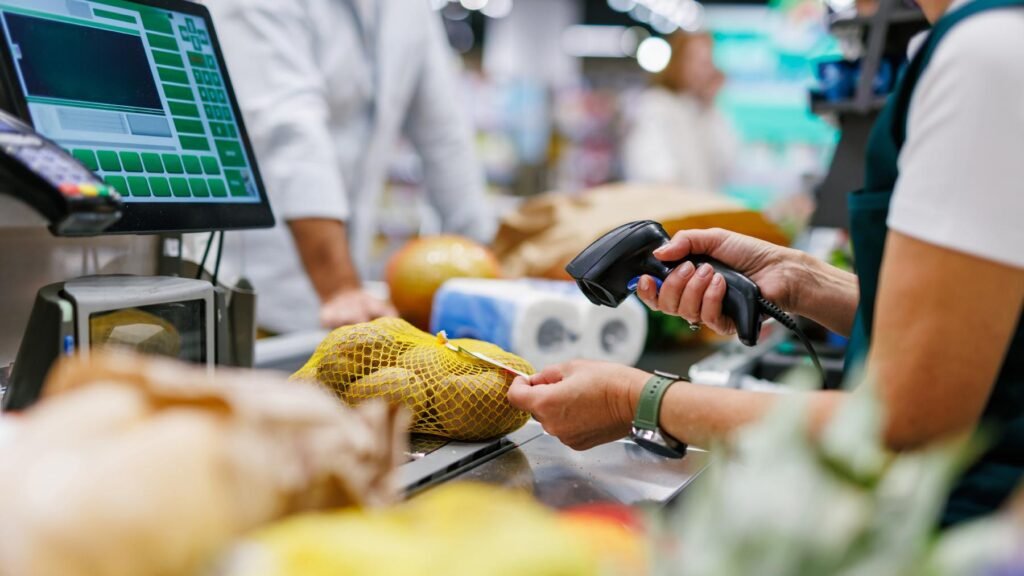
Barcode scanning can make a significant difference during busy checkout periods. Instead of searching for products or entering prices manually, staff can scan a product’s barcode to add it to a sale.
This can help speed up transactions, reduce manual entry errors, and create a smoother checkout experience for customers.
When comparing grocery store POS systems, check whether the software supports barcode scanners and allows you to assign barcodes to products easily. It is also worth checking how the system handles products with missing, damaged, or duplicate barcodes.
For stores with a large product range, efficient barcode management can save staff time throughout the day.
3. Check Support for Products Sold by Weight
Many grocery stores sell fresh produce, meat, seafood, and other products priced by weight. These products require a POS system that can handle different units of measurement and calculate prices accurately.
For example, if apples cost $4.00 per kilogram, the system should calculate the correct price based on the weight sold.
Before choosing a POS system, check whether it supports:
- Products priced per kilogram or other units
- Integration with compatible weighing scales, where required
- Accurate quantity and price calculations
- Different pricing methods for packaged and loose products
If your store sells products by weight, confirm that the POS software supports your weighing and checkout workflow before purchasing hardware.
4. Make Sure Product Pricing Is Easy to Manage
Grocery stores frequently update prices, introduce promotions, and adjust product details. Managing these changes manually across a large product range can become time-consuming.
A suitable POS system should make it easy to update selling prices, organise products into categories, and review product information.
Useful pricing features include:
- Quick product price updates
- Product categories and subcategories
- Support for applicable discounts and promotions
- Clear product and price information at checkout
- Sales reports that help identify product performance
Accurate pricing helps prevent checkout mistakes and gives customers greater confidence in their purchases.
5. Look for Integrated EFTPOS Payments
Payment processing is another important consideration when choosing a grocery store POS system in Australia. A system that integrates with a compatible EFTPOS terminal can help connect the checkout and payment processes.
With an integrated setup, the payment amount can be sent from the POS system to the EFTPOS terminal, reducing the need for staff to enter the amount manually.
Depending on the integration, this can help reduce keying errors and make transaction reconciliation easier.
Before choosing a system, check:
- Which EFTPOS providers and terminals are supported
- Whether the integration suits your existing checkout setup
- How the system handles declined, cancelled, or interrupted payments
- Whether transaction records can be reconciled between the POS and payment provider
It is also important to understand how the system handles situations where a payment is approved by the terminal but the POS does not complete the sale. Clear transaction records and a reliable support process can help staff investigate these situations.
6. Review Sales Reports and Business Insights
Sales reports help grocery store owners understand what is happening in their business. Instead of relying on guesswork, you can use sales information to make better decisions about stock, pricing, and daily operations.
Look for a POS system that provides useful reports, such as:
- Daily, weekly, and monthly sales
- Best-selling and slow-moving products
- Sales by product category
- Payment method summaries
- Staff sales activity, where supported
These reports can help you identify popular products, recognise sales trends, and make more informed stock purchasing decisions.
The best reporting features are those that present information clearly and make it easy to find the details you need.
7. Consider the POS Hardware You Need
The software is only one part of a grocery store POS setup. You should also consider the hardware required to run your checkout efficiently.
Depending on your store’s size and operations, your setup may include:
- A touchscreen POS computer or terminal
- A barcode scanner
- A receipt printer
- An EFTPOS terminal
- A compatible weighing scale
- Label or barcode printers, where required
Not every grocery store needs every device. The right setup depends on your product range, checkout layout, and business requirements.
Before purchasing equipment, confirm that the hardware is compatible with the POS software. Also, consider the availability of replacement equipment and technical support if a device stops working.
8. Check Reliability, Data Security, and Technical Support
A POS system plays an important role in everyday grocery store operations. If the system freezes during checkout, stops communicating with a payment terminal, or fails to update information correctly, it can disrupt sales and frustrate customers.
When comparing providers, ask about system reliability, data backup, user permissions, software updates, and troubleshooting support.
You should also understand what happens if your internet connection fails. Some systems support limited offline operations, while others require an active connection for particular functions. Confirm exactly which sales, payment, and synchronisation features remain available during an outage.
Reliable support is especially important when your store depends on its POS system throughout the trading day.
9. Compare the Total Cost of Ownership
Price matters, but the cheapest POS system may not always be the most suitable option for your store.
When comparing providers, consider the full cost of setting up and maintaining the system, including:
- Software subscription or licence fees
- POS hardware and installation
- EFTPOS integration and associated fees
- Training and onboarding
- Ongoing technical support
- Additional terminals or future upgrades
Ask for a clear breakdown of the costs before committing. This will help you compare systems fairly and avoid unexpected expenses later.
A system that saves staff time, improves stock accuracy, and supports your daily workflow may provide better long-term value than one selected on price alone.
10. Choose a POS System That Can Grow With Your Business
Your grocery store’s needs may change over time. You might expand your product range, add another checkout, open a second location, or introduce new payment methods.
Choosing a flexible POS system can make these changes easier to manage.
Consider whether the system can support additional terminals, larger product catalogues, new hardware, and the reporting features you may need as your business grows.
It is also worth asking how product information, sales data, and settings are managed across multiple stores if you plan to expand.
Why Choose Dibtech for Your Grocery Store POS Needs?
Choosing a POS system is about finding a solution that fits your store’s everyday operations. From scanning products at checkout to managing prices, processing payments, and reviewing sales, the right setup can help your team work more efficiently.
Dibtech provides POS solutions designed for retail and hospitality businesses. When evaluating DibPOS for your grocery store, discuss your product range, inventory requirements, barcode scanning needs, weighing-scale compatibility, EFTPOS integration, and reporting requirements with the team.
A suitable setup should match your actual workflow rather than require your staff to work around the limitations of the system.
Final Thoughts
Choosing the best grocery store POS system in Australia starts with understanding what your business needs most. Inventory management, barcode scanning, product weighing, pricing controls, EFTPOS integration, and sales reporting are all important features to consider.
Before making a decision, compare the available systems, confirm hardware compatibility, understand the total cost, and ask for a demonstration of the features you will use every day.
The right POS system can help simplify checkout operations, improve stock visibility, and give you more time to focus on serving customers and growing your grocery business.