How POS Systems Help Businesses Manage In-Store and Online Orders
Modern businesses no longer rely only on customers walking into physical stores to generate sales. With the growth of online shopping and digital ordering, customers expect businesses to offer convenient ways to browse products, place orders, and make payments.
Managing both online and in-store sales can become challenging when businesses use separate systems. Staff may need to enter orders manually, update inventory across different platforms, and check sales information from multiple sources. These tasks can increase workload and create opportunities for errors.
This is where a Point of Sale (POS) system becomes valuable.
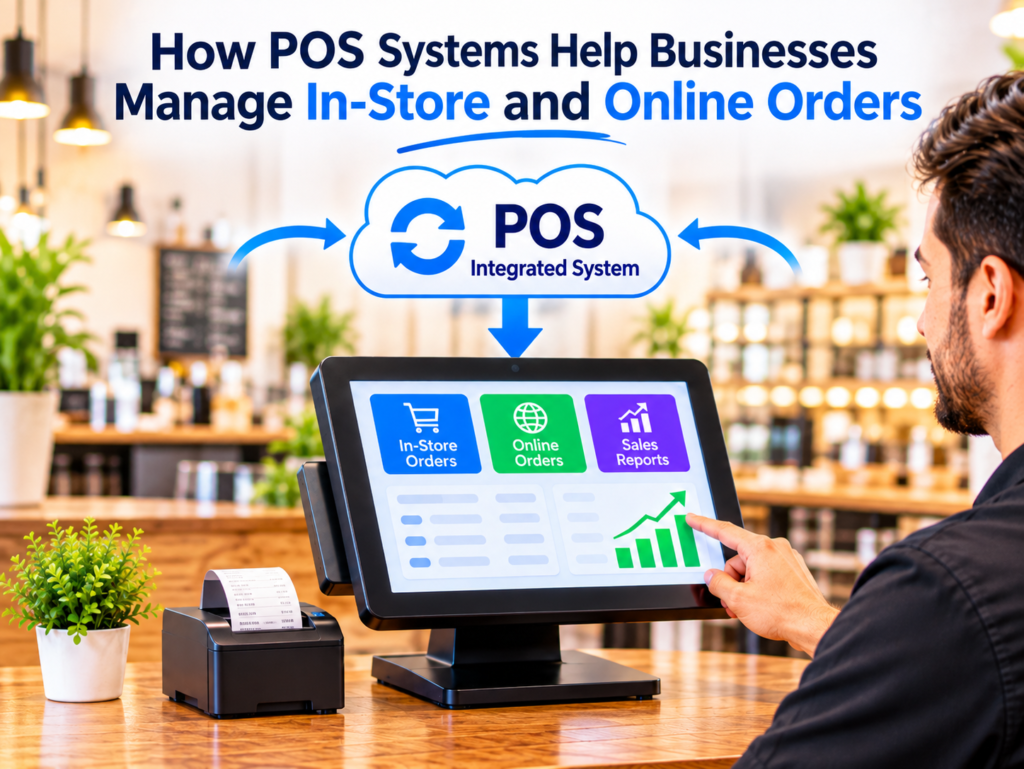
A modern POS system can help businesses manage in-store transactions and online orders through an integrated platform. By connecting sales channels, inventory, payments, and reporting, businesses can streamline daily operations and provide a better customer experience.
Let’s explore how POS systems help businesses manage in-store and online orders more effectively.
1. Manage In-Store and Online Orders in One Place
One of the biggest advantages of an integrated POS system is centralised order management.
Businesses that sell through physical stores and online platforms often struggle to monitor orders from different channels. Managing them separately can make daily operations more complicated.
A POS system with online ordering integration can bring supported orders together in one place.
For example, a grocery store may receive orders from customers shopping inside the store and customers placing orders through its website. Staff can manage both types of orders through the POS system instead of switching between multiple platforms.
This helps businesses:
- Monitor incoming orders more easily.
- Manage different sales channels.
- Reduce manual order entry.
- Improve order visibility.
- Keep daily operations organised.
2. Improve Order Processing Speed
Processing orders quickly is important for maintaining customer satisfaction.
When businesses receive online orders separately, employees may need to check another platform, manually enter the order, and communicate the details to the relevant team.
An integrated POS system can simplify this process by transferring supported online orders directly into the POS workflow.
For example, when a customer places an online order at a restaurant, the order can appear in the POS system and be sent to the kitchen printer or Kitchen Display System (KDS), depending on the setup.
For retail businesses, employees can receive online orders and prepare products for collection or delivery.
This reduces unnecessary steps and helps staff process orders more efficiently.
3. Keep Inventory Updated Across Sales Channels
Inventory management becomes more challenging when businesses sell products both online and in-store.
Without proper stock synchronisation, a product may appear available online even after it has been sold in the physical store.
An integrated POS system can help synchronise inventory across connected sales channels, depending on the platform’s capabilities.
For example, imagine a store has only five units of a product available. When customers purchase products in-store or online, the integrated inventory system can update the available quantity across supported channels.
This helps businesses:
- Maintain more accurate stock levels.
- Reduce the risk of overselling.
- Identify low-stock products.
- Monitor product movement.
- Plan stock replenishment.
Accurate inventory information also helps customers avoid ordering products that are unavailable.
4. Reduce Manual Order Entry and Mistakes
Manually entering orders from different platforms can create unnecessary work for employees.
Staff may accidentally enter incorrect quantities, select the wrong products, or overlook customer instructions.
A POS system integrated with online ordering can transfer order details automatically, reducing the need for employees to re-enter information.
For example, if a customer purchases three products through an online store, the order can be transferred to the POS with the selected products and quantities.
This can help reduce:
- Incorrect product selections.
- Quantity entry mistakes.
- Duplicate order entries.
- Missed order details.
- Manual communication errors.
Reducing repetitive tasks allows employees to focus on fulfilling orders and assisting customers.
5. Offer Customers More Convenient Ordering Options
Customer convenience is an important part of the modern shopping experience.
Some customers prefer visiting physical stores, while others prefer placing orders online from their smartphones or computers.
A POS system connected to online ordering allows businesses to support different shopping preferences.
Depending on the platform, customers may be able to:
- Browse products online.
- View product descriptions and images.
- Place orders at any time.
- Choose pickup or delivery.
- Make online payments.
- Receive order confirmations and updates.
Offering multiple ordering options helps businesses make shopping easier and reach customers through different sales channels.
6. Improve Order Tracking and Fulfilment
Businesses need to know which orders are new, being prepared, ready for collection, or completed.
Managing this information manually can become difficult when order volumes increase.
A POS system with order management features can help employees monitor order progress through supported status updates.
For example, a restaurant may manage orders using statuses such as:
- New order.
- Preparing.
- Ready for collection.
- Completed.
Retail businesses can use similar workflows to manage online purchases, prepare products, and coordinate delivery or customer pickup.
Clear order visibility helps employees understand which tasks need attention and reduces the possibility of missing orders.
7. Manage Sales and Payments More Effectively
Businesses accepting payments through multiple channels need an organised way to manage transaction information.
An integrated POS system can help record sales and payment details associated with in-store and online orders.
For example, physical store transactions may be processed through a connected EFTPOS terminal, while online customers may pay through a supported payment gateway.
Depending on the integration, businesses can review:
- Total sales.
- Online and in-store transactions.
- Payment methods.
- Completed and pending payments.
- Refunds and transaction records.
- Daily sales summaries.
This makes it easier to monitor business activity and manage financial records.
8. Track Business Performance Through Sales Reports
Sales reporting helps business owners understand how their business is performing across different channels.
When online ordering is connected to POS software, businesses may be able to review combined sales information through available reports.
These reports can help identify:
- Total online and in-store sales.
- Best-selling products.
- Popular product categories.
- Peak sales periods.
- Order volumes.
- Payment trends.
- Promotional performance.
For example, a retailer may discover that certain products sell more frequently through online orders than through physical stores.
This information can help management improve product selection, stock planning, pricing, and promotional strategies.
9. Increase Sales Through Promotions and Upselling
An integrated POS and online ordering solution can create more opportunities to promote products and encourage additional purchases.
Businesses can display offers through their online ordering platforms while managing supported promotions through the POS system.
Examples include:
- Buy-one-get-one offers.
- Seasonal discounts.
- Product bundles.
- Special meal combinations.
- Discounts on selected products.
- Loyalty rewards.
Online ordering platforms can also recommend related products during shopping or checkout.
For example, customers buying a coffee machine may be encouraged to add coffee beans or accessories.
These recommendations can increase average order value and help businesses generate additional sales.
10. Improve Staff Productivity
Managing orders from several platforms can increase employee workload, especially during busy periods.
Employees may need to switch between systems, check order details, update stock, and communicate with different departments.
A connected POS system can reduce some of these repetitive activities by bringing supported order information into one workflow.
Staff can spend more time:
- Preparing customer orders.
- Serving customers.
- Managing product availability.
- Organising collections and deliveries.
- Resolving customer enquiries.
This can improve teamwork and help businesses manage larger order volumes more effectively.
11. Support Business Growth and Multiple Locations
As businesses expand, managing sales across different channels and locations becomes more complex.
A scalable POS solution can help businesses manage products, inventory, transactions, and reporting across supported locations.
For example, a retail business operating several branches may use a centralised POS platform to monitor store sales while also managing online orders.
Depending on the software, management may be able to review:
- Sales performance across branches.
- Product availability.
- Online order volumes.
- Stock movement.
- Staff activity.
- Overall business performance.
Having access to organised information helps business owners make better decisions when planning future growth.
Best Practices for Managing Online and In-Store Orders with a POS System
To get the most out of a POS system, businesses should follow these practical steps:
- Choose an integrated platform: Make sure your POS supports the online ordering solution you plan to use.
- Keep product information updated: Maintain accurate prices, descriptions, images, and product availability.
- Synchronise inventory: Configure stock updates across connected sales channels.
- Organise order workflows: Ensure orders reach the correct employees or preparation stations.
- Configure payment methods: Test online payments and in-store EFTPOS transactions.
- Train employees: Teach staff how to receive, manage, and complete orders.
- Monitor sales reports: Review online and in-store sales performance regularly.
- Test the integration: Check that orders, stock updates, payments, and notifications work correctly.
Following these practices can help businesses reduce operational difficulties and create a smoother ordering process.
Conclusion
Managing in-store and online orders does not have to be complicated. With the right POS system, businesses can connect different sales channels, improve order processing, maintain better inventory visibility, and manage payments more efficiently.
An integrated POS solution also helps employees reduce repetitive tasks while providing customers with more convenient ways to shop and place orders.