How Products Sold by Weight Work With a POS System
Not every product in a retail store has a fixed price. Fruit, vegetables, meat, deli products, and other goods are often sold by weight. Instead of charging customers for one item, the business charges based on how much the product weighs.
This can make checkout more complicated than selling products with a fixed price. Fortunately, a modern POS system can work with weighing scales to calculate the correct price automatically.
But how does it actually work?
What Does “Sold by Weight” Mean?
A product sold by weight is priced according to its weight rather than a fixed quantity.
For example, a grocery store may sell apples for $4.00 per kilogram.
If a customer buys 1.5 kg of apples, the POS needs to calculate the total price.
The calculation is simple:
1.5 kg × $4.00 = $6.00
Instead of entering the price manually, an integrated POS and weighing scale can handle this calculation as part of the checkout process.
How Does a POS System Handle Products by Weight?
The basic process is straightforward.
Product → Weighing scale → POS system → Price calculated → Customer pays
The POS stores the product and its price per unit of weight.
When the product is weighed, the weight is sent to the POS. The system then calculates the final price.
For example:
- Product: Apples
- Price: $4.00 per kg
- Weight: 1.5 kg
- Total: $6.00
This helps reduce manual calculations and makes checkout faster.
How Does the Weighing Scale Connect to the POS?
Depending on the POS setup, a weighing scale can communicate with the POS directly.
The scale provides the weight, while the POS provides the product information and pricing.
Once the weight is received, the POS can calculate the total amount.
This means staff do not always need to type the weight manually.
A typical setup might look like this:
Weighing scale → POS system → Receipt → Payment
The exact connection depends on the hardware and POS software being used.
What Products Are Commonly Sold by Weight?
Many businesses use weight-based pricing.
Common examples include:
- Fruit and vegetables
- Meat
- Seafood
- Deli products
- Cheese
- Nuts
- Spices
- Bulk foods
- Sweets
- Some bakery products
For grocery stores and specialty food retailers, weight-based products can make up a significant part of daily sales.
Price Per Kilogram vs Price Per Gram
Businesses can use different units depending on the product.
For example, a store may price a product at:
$10 per kilogram
Another product may be sold using a different unit.
The important part is that the POS and scale use the correct unit and pricing configuration.
A small setup error can result in an incorrect price, so products should be configured carefully.
What Happens at Checkout?
Let’s look at a simple example.
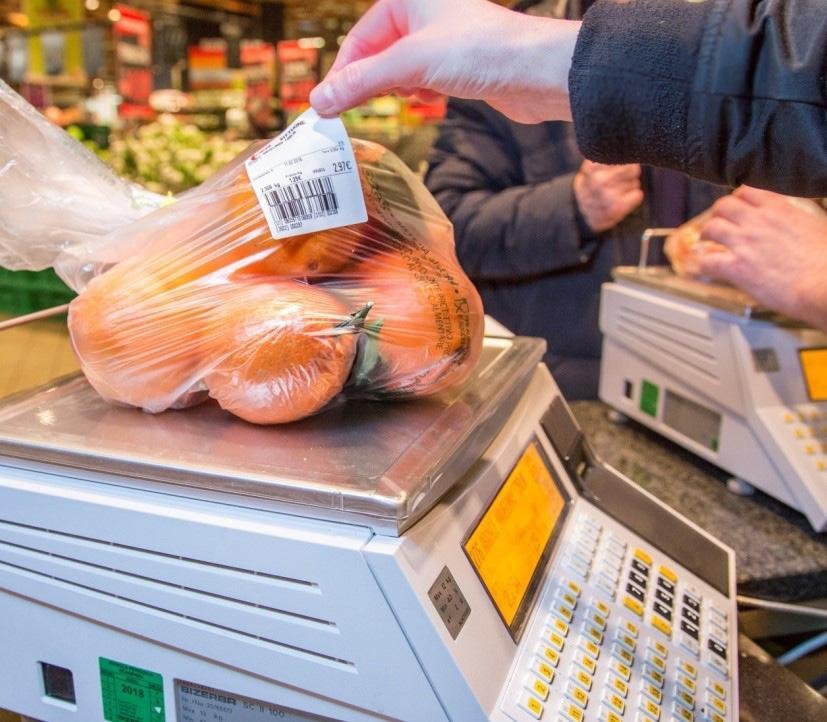
A customer wants to buy some oranges.
The store sells oranges for $3.50 per kilogram.
The staff member places the oranges on the scale. The scale measures 2.2 kg.
The POS then calculates:
2.2 kg × $3.50 = $7.70
The $7.70 amount is added to the customer’s sale.
The customer can then pay using cash, EFTPOS or another available payment method.
This process can happen quickly when the scale and POS are properly configured.
What About Barcodes?
Some weight-based products can also use barcodes.
A barcode can contain information about the product and, depending on the setup, the weight or price.
This is common in some grocery and supermarket environments.
For example, a weighed product can receive a barcode label. The barcode is then scanned at checkout.
The POS reads the barcode and adds the product to the sale.
This can be useful when products are weighed away from the checkout.
Why POS Integration Matters
A weighing scale and POS system need to work together correctly.
Without proper integration, staff may need to:
- Weigh the product.
- Read the weight.
- Calculate the price.
- Enter the information into the POS.
This creates additional steps.
It can also increase the chance of mistakes.
With an integrated setup, the weight can be sent directly to the POS. The system can then calculate the price automatically.
Benefits of Using a POS With a Weighing Scale
Faster Checkout
Automatic weight entry can reduce the amount of information staff need to enter manually.
This can be particularly helpful during busy periods.
Fewer Manual Calculations
The POS can calculate the final price based on the stored price and measured weight.
This reduces the need for staff to perform calculations themselves.
More Accurate Pricing
When products and pricing are configured correctly, the system can consistently apply the correct price.
This can help reduce pricing mistakes at checkout.
Easier Product Management
Businesses can manage weight-based products alongside their other products.
This means fixed-price products and weight-based products can be handled within the same POS system.
What Businesses Should Check Before Setting It Up
Before connecting a weighing scale to a POS system, businesses should check a few important things.
1. Hardware Compatibility
Make sure the weighing scale is compatible with the POS system.
Not every scale can communicate with every POS.
2. Product Configuration
Each weight-based product should have the correct pricing and unit configured.
3. Measurement Units
Check whether products are being sold by kilograms, grams or another supported unit.
4. Network or Connection
If the scale communicates with the POS through a network or cable, make sure the connection is reliable.
5. Staff Training
Staff should understand how to weigh products and confirm that the correct product and price are being used.
Common Problems With Weight-Based Products
Weight-based products can sometimes cause problems when the setup is incorrect.
For example:
- The POS may show the wrong price.
- The weight may not appear on the POS.
- The scale may not connect.
- The wrong product may be selected.
- The unit of measurement may be incorrect.
- A barcode may not scan correctly.
Many of these problems can be prevented by checking the hardware, product settings and connection before the system goes live.
Can Small Grocery Stores Use Weight-Based POS Systems?
Yes. Weight-based POS functionality is not limited to large supermarkets.
Small grocery stores, fruit shops, delis, and specialty food stores can also use weighing scales with their POS system. The important thing is choosing hardware and software that work together and configuring the products correctly.
Final Thoughts
Selling products by weight does not need to make checkout complicated. With the right POS system and weighing scale, businesses can measure products, calculate prices, and process sales more efficiently. The POS stores the product and pricing information, while the scale provides the weight. Together, they can create a smoother checkout process.
For businesses selling fruit, vegetables, meat, deli products or other goods by weight, a properly configured POS and scale setup can make everyday transactions easier for both staff and customers.