Kitchen Printers vs. Kitchen Display Systems
Getting orders to the kitchen quickly is important for every restaurant. The right kitchen setup can help staff work faster and reduce order mistakes. Two common options are kitchen printers and kitchen display systems (KDS). Both can connect with a restaurant POS system and send orders to the kitchen.
However, they work in different ways. A kitchen printer produces a physical order ticket. A KDS displays orders digitally on a screen.
So, which option should your restaurant choose? It depends on your kitchen, workflow, budget, and order volume.
What Is a Kitchen Printer?
A kitchen printer is a thermal printer that connects to your POS system. When a customer places an order, the POS sends the relevant items to the kitchen printer. The printer then produces an order ticket for the kitchen staff.
For example, a restaurant may have separate printers for:
- Kitchen orders
- Drinks
- Desserts
- Takeaway orders
Kitchen printers are simple and familiar. As a result, they remain a popular choice for many restaurants.
What Is a Kitchen Display System?
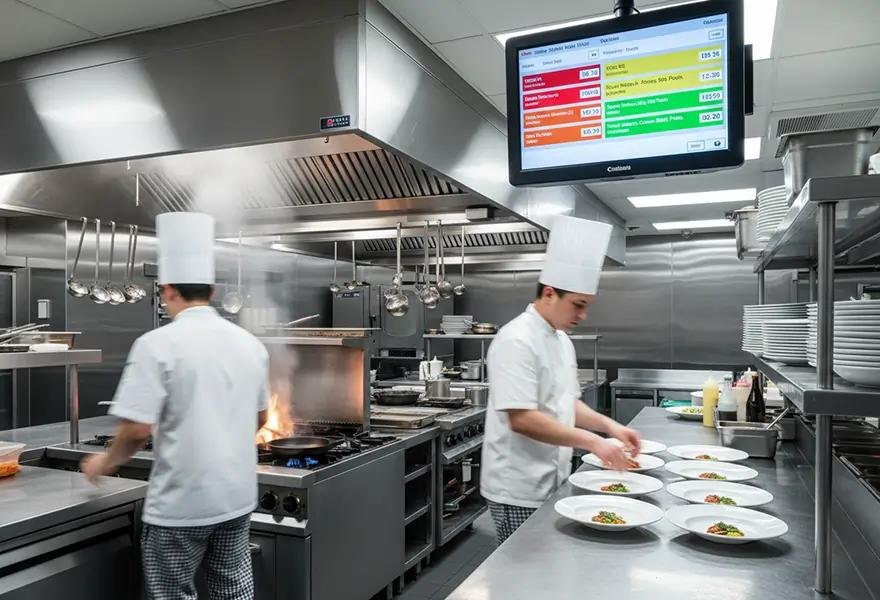
A Kitchen Display System, or KDS, displays orders on a digital screen instead of printing tickets. When an order is placed through the POS, it appears on the kitchen screen. Staff can then view the order and start preparing it. Orders can also be organised by station, order type, or preparation status, depending on the system. This can make it easier for kitchen staff to manage a busy service.
Kitchen Printer vs Kitchen Display System
The biggest difference is simple.
A kitchen printer uses paper tickets. A KDS uses digital screens.
| Feature | Kitchen Printer | Kitchen Display System |
| Order tickets | Printed | Digital |
| Paper | Required | Not required |
| Order visibility | Physical tickets | Live screen |
| Order management | Mostly manual | Digital |
| Multiple stations | Possible | Easy to manage |
| Initial cost | Generally lower | Generally higher |
| Best for | Smaller kitchens | Busy or larger kitchens |
Both options can work well. However, the right choice depends on your restaurant’s needs.
Benefits of Kitchen Printers
Simple for Staff
Kitchen printers are easy to understand. Staff can read the printed ticket and prepare the order. There is also no need for kitchen staff to learn a new digital system.
Lower Initial Cost
Kitchen printers can be a practical option for restaurants with a smaller budget. The hardware is generally less expensive than installing multiple kitchen display screens.
Easy to Separate Orders
A POS system can send different products to different printers. For example, food orders can go to the kitchen. Drink orders can go to the bar. This helps keep different parts of the restaurant organised.
Familiar Workflow
Many restaurant teams are already comfortable using printed kitchen tickets. Therefore, switching to a kitchen printer may require less training.
Benefits of Kitchen Display Systems
Better Order Visibility
A KDS gives staff a live view of incoming orders. Instead of looking through multiple paper tickets, staff can see orders directly on the screen.
Easier Order Management
Digital orders can be organised by their status. For example, staff can see which orders are:
- New
- Being prepared
- Ready
- Completed
This can make it easier to keep track of orders during busy periods.
Less Paper
A KDS does not require a paper ticket for every order. As a result, restaurants can reduce paper use and avoid managing piles of printed tickets.
Useful for Multiple Stations
A KDS can be useful for kitchens with several preparation areas.
For example, different screens could be used for:
- Grill
- Fryer
- Pizza
- Preparation
- Pass
This allows staff to focus on the orders relevant to their station.
Which Is Better for a Small Restaurant?
For a small restaurant, a kitchen printer may be enough. If the kitchen has only one or two stations, printed tickets can provide a simple way to manage orders. A printer can also be more suitable when keeping equipment costs low is important. However, a KDS can still be useful if the restaurant has plans to grow or wants to move towards a digital kitchen workflow.
Which Is Better for a Busy Restaurant?
Busy restaurants may benefit from a KDS. When order volumes increase, managing many printed tickets can become difficult. A digital display can make it easier to see incoming and outstanding orders. A KDS can also help restaurants with multiple kitchen stations. For example, burger items can be shown at one station while sides are displayed at another. This can help staff focus on their specific tasks.
Can Restaurants Use Both?
Yes.
Restaurants do not always need to choose between a kitchen printer and a KDS.
In some cases, using both can make sense.
For example, a restaurant could use a KDS for the main kitchen while using a printer for takeaway orders or the bar.
The setup will depend on the restaurant’s workflow and POS capabilities.
How Does a POS System Connect to the Kitchen?
Your POS system acts as the link between the front of house and the kitchen. When staff enter an order into the POS, the system determines where each item should be sent.
The basic process looks like this:
Customer order → POS → Kitchen printer or KDS → Kitchen staff
With the right setup, different products can be directed to the correct kitchen station. This is especially useful for restaurants with large menus or multiple preparation areas.
What Should Restaurants Consider?
Before choosing a kitchen printer or KDS, consider the following factors.
1. Order Volume
How many orders does your restaurant handle during busy periods? A smaller restaurant may work well with printed tickets. A high-volume restaurant may benefit from digital order management.
2. Kitchen Size
Consider how many stations your kitchen has. A simple kitchen may only need one printer. A larger kitchen may benefit from several printers or KDS screens.
3. Budget
Budget is another important factor. Kitchen printers usually have a lower initial hardware cost. A KDS requires screens and additional equipment.
4. Staff Workflow
Think about how your staff currently work. If your team is comfortable with printed tickets, a kitchen printer may be easier to introduce. On the other hand, a KDS can provide a more digital workflow.
5. POS Compatibility
Finally, check whether your POS system supports the equipment you want to use. The POS should be able to send orders reliably to the correct printer or display.
Kitchen Printer or KDS: Which One Should You Choose?
There is no single solution for every restaurant.
A kitchen printer can be a simple and cost-effective option for smaller restaurants and straightforward kitchens.
A kitchen display system can provide better digital visibility for busy restaurants and kitchens with multiple stations.
In some cases, using both can provide the flexibility a restaurant needs. The best choice is the one that fits your kitchen workflow, order volume, and budget.
Final Thoughts
Choosing the right kitchen technology can simplify daily restaurant operations. A kitchen printer provides a simple way to send orders to staff. A KDS provides a digital way to manage those orders. Before making a decision, look at how your restaurant currently handles orders.
Consider your kitchen size, order volume, staff workflow, and POS system. Then choose the setup that supports your team without adding unnecessary complexity. With the right POS and kitchen setup, orders can move smoothly from the customer to the kitchen and help your staff stay organised during busy service.