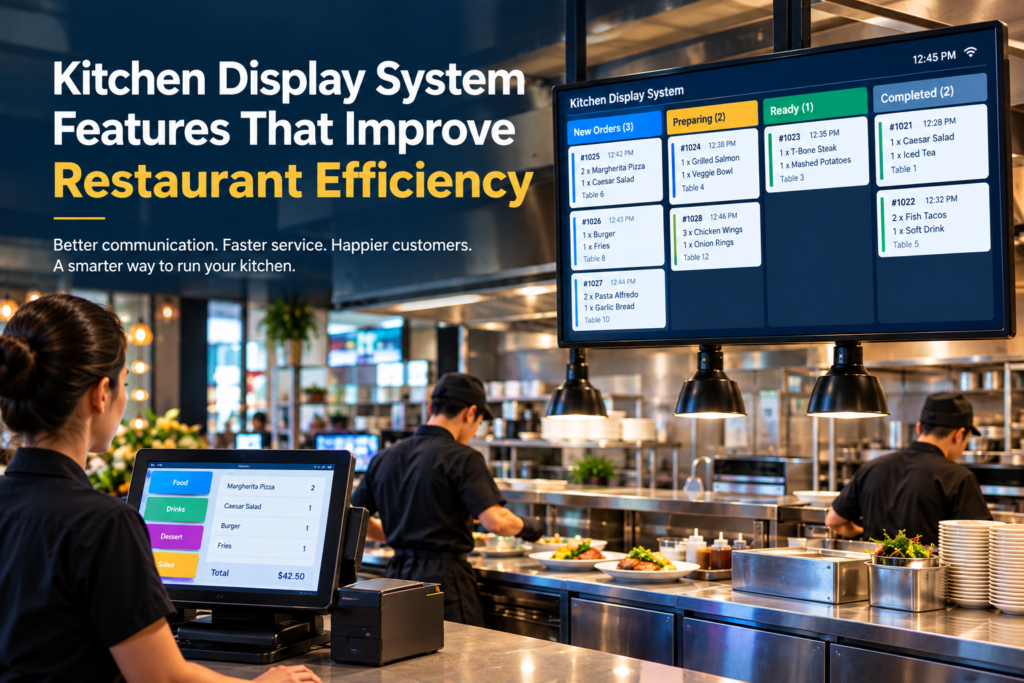
Kitchen Display System Features That Improve Restaurant Efficiency
Running a busy restaurant requires more than great food and excellent customer service. Behind every successful service is an efficient kitchen where orders are received, prepared, prioritized, and completed without unnecessary delays.
Traditional paper tickets and verbal communication can make it difficult for kitchen staff to keep track of multiple orders, especially during peak hours. A Kitchen Display System (KDS) provides a digital solution by connecting the restaurant’s front-of-house operations with the kitchen.
A modern KDS helps restaurants organize orders, improve communication, reduce errors, and speed up kitchen operations. In this article, we’ll explore the key Kitchen Display System features that can improve restaurant efficiency and create a smoother workflow.
What Is a Kitchen Display System?
A Kitchen Display System is a digital order management solution that displays customer orders on screens in the kitchen.
Instead of relying on printed kitchen dockets, orders from the restaurant’s POS system can be sent directly to the appropriate kitchen station. Staff can then view, prioritize, and update orders as they move through the preparation process.
A KDS can be particularly useful for restaurants, cafés, takeaway businesses, food courts, and other hospitality operations handling high volumes of orders.
1. Real-Time Order Display
One of the most important KDS features is real-time order synchronization.
When a staff member enters an order through the POS system, the order can appear on the kitchen display almost immediately. Kitchen staff no longer need to wait for printed tickets or rely on verbal communication.
This can help:
- Reduce communication delays
- Improve order visibility
- Keep kitchen staff informed
- Reduce the risk of missed orders
Real-time order management becomes especially valuable during busy service periods.
2. Order Prioritization
During peak hours, kitchens may receive many orders at the same time. Without an organized system, staff may struggle to determine which orders need immediate attention.
A KDS can organize orders according to factors such as:
- Order time
- Order type
- Preparation status
- Table number
- Takeaway or delivery requirements
This gives kitchen staff a clearer overview of what needs to be prepared next.
3. Multiple Kitchen Stations
Restaurants often have different preparation areas for different types of food.
For example, a restaurant might have separate stations for:
- Grill
- Pizza
- Salads
- Desserts
- Drinks
- Hot food
A modern KDS can route individual items to the appropriate kitchen station automatically.
For example, a burger order can appear at the grill station while a drink appears at the beverage station. This reduces unnecessary communication between kitchen employees and helps each team focus on its specific tasks.
4. Order Status Tracking
A digital kitchen display makes it easier to track the status of every order.
Kitchen staff can update orders as they progress through stages such as:
New → Preparing → Ready → Completed
This provides front-of-house staff with better visibility into kitchen progress.
Instead of repeatedly asking the kitchen about an order, staff can check its current status through the system.
5. Reduced Order Errors
Miscommunication between servers and kitchen staff can result in incorrect meals, missing items, or special requests being overlooked.
A KDS displays order details digitally, including relevant modifiers and instructions entered through the POS.
This can help reduce errors caused by:
- Misread handwriting
- Verbal communication
- Lost paper tickets
- Incorrect item information
- Missed modifications
Improved order accuracy can lead to better customer experiences and less food waste.
6. Preparation Time Monitoring
Restaurant managers need to understand how efficiently the kitchen is operating.
Many KDS solutions can track order preparation times, helping managers identify delays and bottlenecks.
For example, if certain orders consistently take longer than expected, management can investigate whether the issue is related to staffing, equipment, menu complexity, or workflow.
This information can support more informed operational decisions.
7. Improved Communication Between Front and Back of House
Communication between the front-of-house and kitchen teams is essential for restaurant efficiency.
A KDS creates a centralized digital communication channel between these areas.
Servers can send orders directly from the POS to the kitchen, while kitchen staff can update order progress digitally.
This reduces the need for constant verbal communication and helps create a more organized workflow.
8. Support for Different Order Types
Modern restaurants handle orders from multiple sources.
A KDS can help organize orders such as:
- Dine-in
- Takeaway
- Delivery
- Online orders
- Pickup orders
Having these orders displayed in one organized system helps kitchen staff understand where each order needs to go and how it should be prepared.
9. Improved Kitchen Productivity
A well-designed KDS gives kitchen staff a clear view of current workloads.
Instead of managing piles of paper tickets, employees can see active orders on a digital screen and focus on preparing meals.
This can help improve:
- Workflow organization
- Staff productivity
- Order visibility
- Kitchen coordination
The result is a more structured kitchen environment, particularly during busy periods.
10. Integration with POS Systems
One of the most important features to consider when choosing a KDS is POS integration.
When the POS and KDS work together, orders can automatically flow from the point of sale to the kitchen without requiring additional manual entry.
This creates a connected workflow:
Customer → POS → Kitchen Display → Food Preparation → Order Completion
Integration reduces duplicate data entry and helps ensure that the kitchen receives the same order information entered by the front-of-house team.
11. Digital Kitchen Tickets
Replacing paper tickets with digital displays can reduce the dependency on physical kitchen dockets.
Digital tickets are easier to organize, update, and track. Restaurants can also avoid problems such as:
- Lost tickets
- Damaged paper
- Unreadable handwriting
- Ticket clutter
This creates a cleaner and more organized kitchen workspace.
12. Performance Reporting and Analytics
Some advanced KDS solutions provide reporting tools that allow restaurant managers to analyze kitchen performance.
Useful metrics can include:
- Average preparation time
- Order completion time
- Number of completed orders
- Delayed orders
- Peak kitchen periods
These insights can help restaurant owners identify operational bottlenecks and improve staffing and kitchen processes.
How a KDS Improves the Overall Restaurant Workflow
A Kitchen Display System does more than display orders. It connects different parts of the restaurant operation.
A typical workflow looks like this:
1. Customer places an order
↓
2. Staff enters the order into the POS
↓
3. Order is automatically sent to the KDS
↓
4. Items are routed to the appropriate kitchen stations
↓
5. Kitchen staff prepare the order
↓
6. Order status is updated
↓
7. Front-of-house staff are notified that the order is ready
↓
8. Order is served or handed to the customer
This connected workflow can help reduce delays and improve coordination between restaurant teams.
How to Choose the Right Kitchen Display System
Not every restaurant has the same operational requirements. When selecting a KDS, consider features such as:
- POS integration
- Real-time order synchronization
- Multiple kitchen station support
- Order prioritization
- Preparation time tracking
- Customizable workflows
- Easy-to-use interface
- Reporting and analytics
- Support for dine-in, takeaway, and online orders
- Reliable hardware and network connectivity
The right solution should fit naturally into your existing restaurant workflow rather than making operations more complicated.
Conclusion
A Kitchen Display System can transform the way restaurants manage orders and coordinate kitchen operations. By replacing paper tickets and manual communication with a centralized digital workflow, restaurants can improve order visibility, reduce errors, monitor preparation times, and create better communication between front-of-house and kitchen staff.
For restaurants looking to improve efficiency and handle increasing order volumes, integrating a modern KDS with a reliable POS system can provide a strong foundation for a faster, more organized, and scalable operation.
The goal isn’t simply to replace paper tickets with screens. It’s to create a connected restaurant workflow where every order is visible, every station knows what to prepare, and staff can focus on delivering quality food and service.
SEO Meta Description
Discover the key Kitchen Display System features that improve restaurant efficiency, reduce order errors, streamline kitchen workflows, and connect your POS with kitchen operations.
Suggested SEO Keywords
- Kitchen Display System
- KDS for restaurants
- Kitchen Display System features
- Restaurant kitchen management
- Restaurant POS and KDS
- Digital kitchen display
- Restaurant order management system
- Kitchen automation system
- Restaurant efficiency
- POS system for restaurants
- Kitchen order management
- Restaurant technology
Suggested URL Slug
/kitchen-display-system-features-restaurant-efficiency/