The Must-Have Features of a Modern Kitchen Display System
In a busy restaurant, managing orders quickly and accurately is essential. As order volumes increase, traditional paper tickets and verbal communication can make it difficult for kitchen staff to keep track of what needs to be prepared.
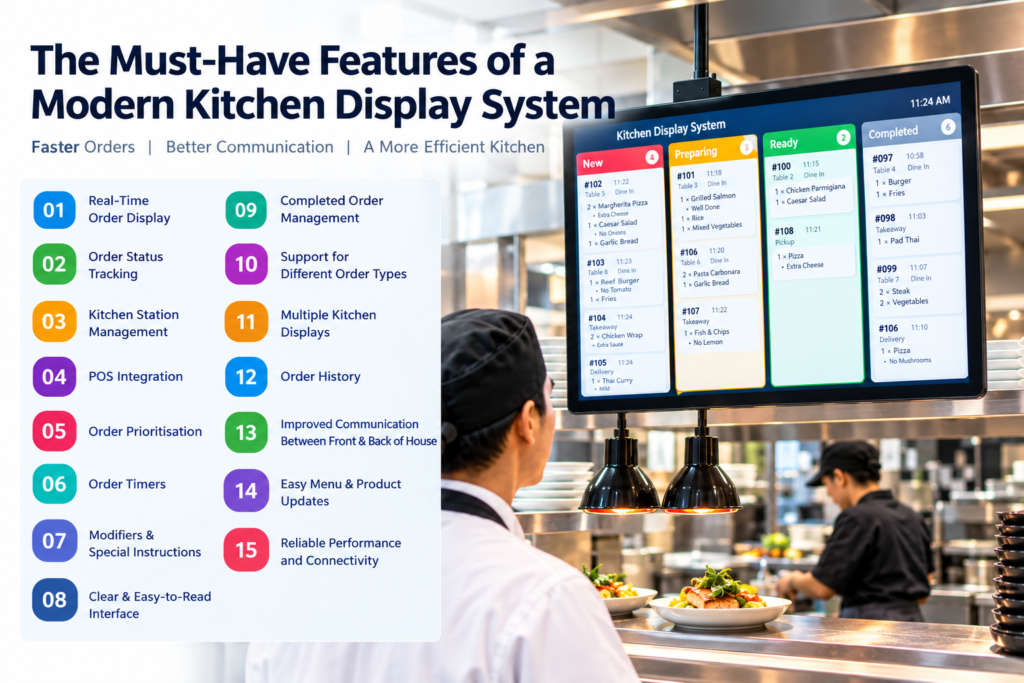
A Kitchen Display System (KDS) provides a digital solution by connecting the restaurant POS with the kitchen. Orders can appear on a kitchen screen in real time, giving kitchen staff a clear view of incoming and pending orders.
But what features should a modern Kitchen Display System have? Let’s explore the key features that can help restaurants improve kitchen efficiency and order management.
1. Real-Time Order Display
One of the most important KDS features is the ability to display new orders in real time.
When an order is entered into the POS, it can immediately appear on the kitchen display. This eliminates the need for staff to physically carry paper tickets to the kitchen.
Real-time order updates help kitchen staff start preparing orders sooner and keep the workflow organised.
2. Order Status Tracking
A modern KDS should allow kitchen staff to track the status of each order.
For example:
New → Preparing → Ready → Completed
This makes it easier for both kitchen and front-of-house staff to understand which orders are being prepared and which are ready to be served.
3. Kitchen Station Management
Restaurants may have several preparation areas, such as:
- Grill
- Pizza
- Fryer
- Salad
- Dessert
- Bar
A KDS can route relevant items to the appropriate kitchen station. This prevents staff from having to sort through unnecessary orders and helps each station focus on its responsibilities.
4. POS Integration
POS integration is an essential feature of a modern KDS.
When the KDS is connected to the restaurant POS, orders entered by front-of-house staff can automatically appear in the kitchen.
This creates a connected workflow:
Customer → POS → KDS → Kitchen → Completed Order
It reduces manual communication and helps maintain consistent order information.
5. Order Prioritisation
During busy periods, some orders may need to be prepared before others.
A useful KDS can help staff identify the order sequence and prioritise orders based on factors such as:
- Order time
- Table number
- Order type
- Preparation requirements
- Waiting time
This gives kitchen staff a clearer understanding of what needs attention.
6. Order Timers
Order timers can show kitchen staff how long an order has been waiting or being prepared.
For example, the display might show:
Order #105 — 08:35
This gives staff a quick visual indication of how long an order has been in the kitchen and can help them monitor preparation times.
7. Modifiers and Special Instructions
Customers frequently request changes to their meals.
Examples include:
- No onions
- Extra cheese
- Add sauce
- Gluten-free
- Well done
- No spicy ingredients
A good KDS should clearly display these modifiers and instructions so kitchen staff can prepare the order according to the customer’s requirements.
8. Clear and Easy-to-Read Interface
Kitchen staff need to understand orders quickly, especially during busy periods.
A modern KDS should provide a simple interface with clearly visible:
- Product names
- Quantities
- Modifiers
- Order numbers
- Table numbers
- Order times
- Order status
A clear display reduces the need for staff to spend time searching through complicated screens.
9. Completed Order Management
Once an order has been prepared, kitchen staff should be able to mark it as completed or ready.
This removes completed orders from the active workload and keeps the display focused on outstanding orders.
It also helps front-of-house employees know when food is ready for collection or delivery to the customer.
10. Support for Different Order Types
Modern restaurants may handle several types of orders, including:
- Dine-in
- Takeaway
- Pickup
- Delivery
- Online orders
A KDS should make it easy for kitchen staff to identify the type of order they are preparing.
This can help prevent confusion between dine-in and takeaway orders, particularly during busy periods.
11. Multiple Kitchen Displays
Larger restaurants may require more than one kitchen display.
For example, one screen could be used for the grill while another is used for the dessert or drinks station.
Multiple displays can help restaurants create a more organised workflow and ensure each kitchen area receives the information it needs.
12. Order History
Order history can help staff and managers review completed orders.
Depending on the POS and KDS setup, historical information can be useful for investigating order issues, reviewing preparation processes, or understanding kitchen workload.
It can also provide management with useful information when reviewing restaurant operations.
13. Improved Communication Between Front and Back of House
A KDS reduces the need for constant verbal communication between front-of-house and kitchen employees.
Instead of asking whether an order has been received or prepared, staff can use the system to check its status.
This can help reduce interruptions and allow both teams to focus on their responsibilities.
14. Easy Menu and Product Updates
Restaurants regularly add new products, change prices, or modify menu items.
A POS-integrated KDS should make it straightforward to update products and ensure that the correct information appears in the kitchen.
This is particularly important when restaurants introduce seasonal menus or change preparation processes.
15. Reliable Performance and Connectivity
A KDS is an important part of the restaurant workflow, so reliability is essential.
Restaurants should ensure that:
- Kitchen displays have a stable connection.
- POS and KDS software are properly configured.
- Network equipment is maintained.
- Staff know what to do if connectivity is interrupted.
- Displays are positioned where kitchen staff can easily see them.
Benefits of Using a Modern Kitchen Display System
With the right features, a KDS can help restaurants:
- Improve order accuracy
- Reduce paper usage
- Speed up order communication
- Organise kitchen stations
- Track order progress
- Reduce unnecessary verbal communication
- Improve staff productivity
- Manage busy periods more effectively
- Provide more consistent customer service
How to Choose the Right Kitchen Display System
Before choosing a KDS, restaurant owners should consider:
- POS compatibility – Can it integrate with the existing POS?
- Kitchen size – Will one display be enough?
- Order volume – Can the system handle busy periods?
- Kitchen stations – Can orders be routed appropriately?
- Ease of use – Can kitchen staff learn the system quickly?
- Order tracking – Does it provide clear order statuses?
- Reliability – Is the system suitable for continuous restaurant use?
- Scalability – Can additional displays or stations be added later?
Conclusion
A modern Kitchen Display System is more than just a digital replacement for paper kitchen tickets. With features such as real-time order display, order tracking, station management, timers, modifiers, prioritisation, and POS integration, it can help restaurants create a more organised and efficient kitchen workflow.
For restaurants handling high order volumes, choosing a KDS with the right combination of features can help connect the front of house with the kitchen and provide staff with the information they need to prepare orders accurately and efficiently.