How POS Systems Help Businesses Track Sales by Terminal
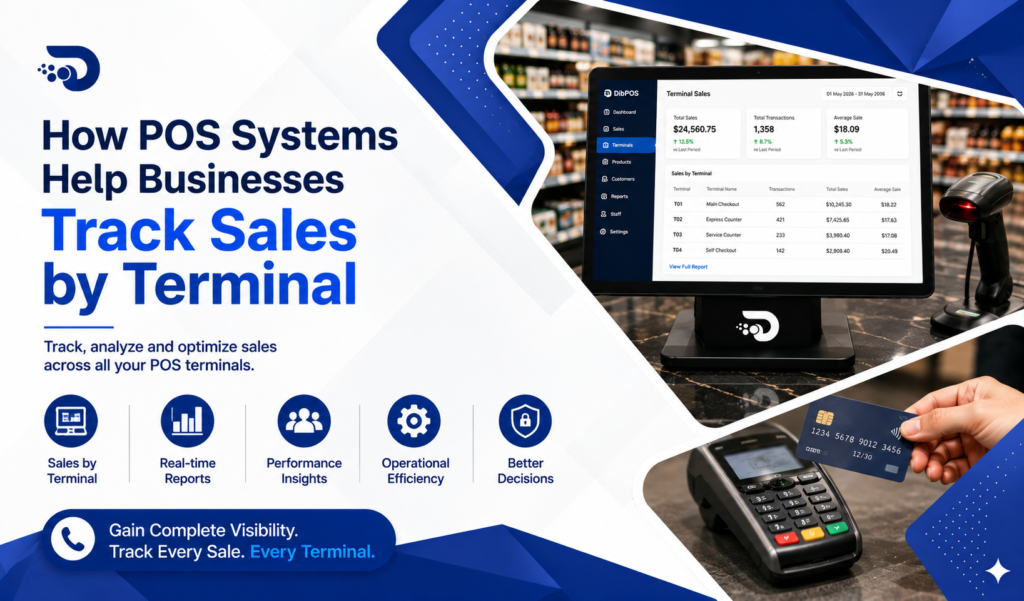
For businesses with multiple checkout points, keeping track of sales across different POS terminals can be challenging. A modern Point of Sale (POS) system makes this process easier by recording and organising transactions according to the terminal where each sale was processed.
Sales by Terminal reporting gives business owners and managers greater visibility into transaction activity, helping them monitor performance, identify issues, and make better operational decisions.
What Is Sales by Terminal?
Sales by Terminal is a POS reporting feature that allows businesses to view sales based on individual POS terminals.
For example, a retail store may have three terminals:
- Terminal 1 – Main Checkout
- Terminal 2 – Secondary Checkout
- Terminal 3 – Service Counter
The POS system can record the transactions processed through each terminal and provide a separate sales summary.
This allows managers to understand how each checkout point is performing.
1. Track Sales From Each Terminal
One of the main benefits of Sales by Terminal reporting is that it provides a clear breakdown of sales.
Managers can see:
- Total sales
- Number of transactions
- Payment amounts
- Transaction dates and times
- Refunds or adjustments
- Sales generated by each terminal
This makes it easier to monitor activity across the business.
2. Compare Terminal Performance
Businesses with multiple checkout terminals can compare their performance.
For example:
| Terminal | Transactions | Total Sales |
|---|---|---|
| Terminal 1 | 145 | $6,850 |
| Terminal 2 | 118 | $5,420 |
| Terminal 3 | 82 | $3,760 |
This information can help managers identify which checkout points are handling the highest volume of transactions.
3. Identify Busy Checkout Points
Sales by Terminal reports can help businesses understand which terminals are busiest.
If one terminal consistently processes more transactions than others, management can investigate whether its location, staffing, or customer flow contributes to the higher activity.
This information can help businesses improve checkout organisation and reduce customer waiting times.
4. Monitor Multiple Checkout Locations
For larger stores, supermarkets, restaurants, or businesses with several POS stations, terminal-based reporting provides better visibility.
Managers can review individual terminal activity without having to manually collect information from each checkout.
This can save time and simplify daily management.
5. Improve Transaction Accuracy
Tracking sales by terminal can make it easier to identify discrepancies.
If the expected sales total for a terminal does not match the recorded cash or payment settlement, managers can investigate the specific terminal’s transactions.
This can help with:
- Cash reconciliation
- Payment verification
- Refund tracking
- Transaction reviews
6. Monitor EFTPOS Transactions
When POS terminals are integrated with EFTPOS, businesses can better connect sales transactions with payment activity.
Managers can review transaction information and identify which terminal processed a particular payment.
This can make payment reconciliation easier and reduce manual data entry.
7. Analyse Sales During Different Periods
Terminal reports can be reviewed for different time periods, such as:
- Daily
- Weekly
- Monthly
- Custom date ranges
Comparing terminal performance over time can help businesses identify changes in transaction volume and sales activity.
For example, a terminal that experiences higher sales during weekends may require additional staff during those periods.
8. Improve Staff Allocation
Sales by Terminal data can also support staffing decisions.
If certain terminals consistently have higher transaction volumes, managers can allocate more employees to those checkout areas during busy periods.
This can help improve service speed and reduce queues.
9. Identify Unusual Transaction Activity
Terminal-based reports can help managers identify unusual activity.
For example, if one terminal suddenly records significantly more refunds or discounts than usual, management can review the relevant transactions.
This provides an additional layer of visibility and accountability.
10. Support Multi-Store Management
For businesses operating multiple locations, terminal-based reporting can provide useful information about sales activity across different checkout points.
When combined with store-level reports, managers can compare:
- Store performance
- Terminal performance
- Transaction volume
- Sales trends
- Payment activity
This can help business owners make more informed decisions about their operations.
11. Make Data-Driven Business Decisions
POS reports provide more than transaction totals. They give businesses useful information that can support operational decisions.
By analysing Sales by Terminal data, managers can determine whether they need to:
- Add another checkout
- Move a terminal
- Adjust staffing
- Improve checkout processes
- Investigate transaction discrepancies
- Upgrade or replace equipment
Using actual sales data makes these decisions more reliable.
Best Practices for Managing Sales by Terminal
To get the most value from terminal-based reporting, businesses should:
Review Reports Regularly
Check terminal sales reports daily or weekly to identify unusual changes.
Reconcile Payments
Compare POS sales totals with cash and EFTPOS settlement information.
Monitor Performance
Compare transaction volume and sales across terminals.
Investigate Discrepancies
Review unusual refunds, discounts, or transaction differences promptly.
Maintain Terminal Information
Keep terminal names and identifiers organised so managers can easily understand reports.
Conclusion
A modern POS system makes it easier for businesses to monitor sales activity across multiple terminals. Sales by Terminal reporting provides valuable information about transaction volumes, sales performance, payment activity, and checkout efficiency.
By analysing this data regularly, businesses can improve staff allocation, identify discrepancies, optimise checkout operations, and make better decisions based on real sales information.
For businesses with multiple POS stations, terminal-based sales reporting can provide the visibility needed to manage transactions more efficiently and improve overall operational performance.