From Scanning to Serving: How QR Table Ordering Transforms Restaurants
The restaurant industry is constantly evolving, with customers expecting faster service, convenient ordering, and a better dining experience. Traditional ordering methods often require customers to wait for menus, call staff, and spend time placing their orders. During busy periods, this can create delays and increase pressure on restaurant employees.
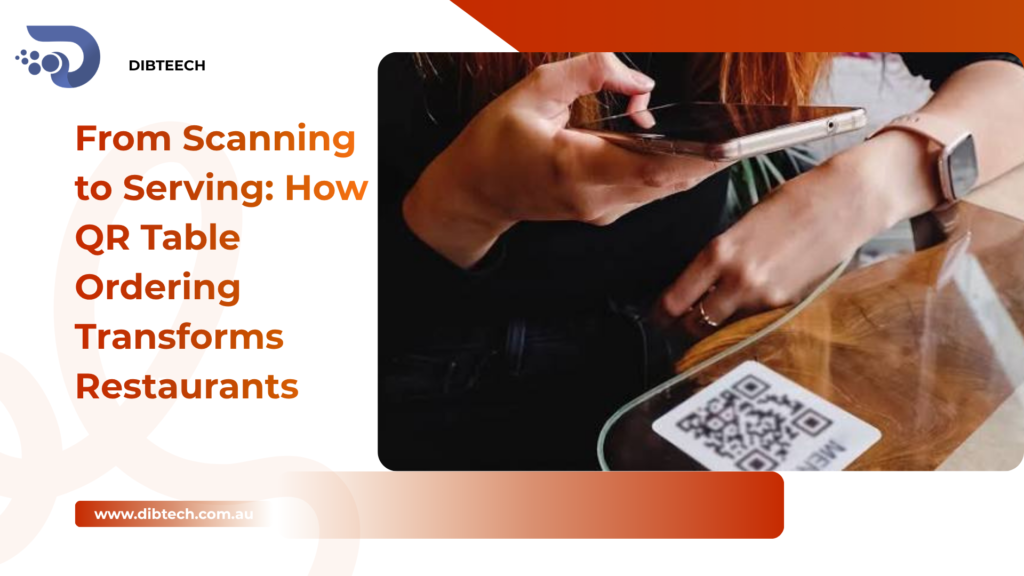
QR table ordering offers a smarter alternative. By simply scanning a QR code placed on their table, customers can access a digital menu, browse available dishes, customise their selections, and place orders directly from their smartphones.
When connected to a restaurant POS system, QR table ordering can transform the way restaurants manage orders, communicate with kitchen staff, and serve customers.
Let’s explore how this technology is changing modern restaurant operations.
1. Simplify the Ordering Process
One of the biggest advantages of QR table ordering is its simplicity.
Customers no longer need to wait for a waiter to bring a printed menu or take their initial order. They can scan the QR code, open the digital menu, and select their preferred food and beverages.
For example, a customer visiting a restaurant can scan the QR code, browse the available meals, select a burger, add fries, choose a drink, and submit the order directly.
This makes ordering more convenient and allows customers to place orders when they are ready.
2. Reduce Customer Waiting Time
Long waiting times can negatively affect the dining experience, particularly during lunch and dinner rush hours.
Traditional ordering requires customers to wait for available staff before placing an order. QR table ordering reduces this dependency by allowing customers to order independently.
Restaurant employees can spend less time taking orders manually and more time preparing tables, serving meals, and assisting customers.
This can help restaurants manage busy periods more efficiently.
3. Improve Order Accuracy
Taking orders manually can sometimes result in incorrect items, missed modifications, or misunderstandings between customers and staff.
QR table ordering allows customers to select items directly from the digital menu and review their choices before submitting an order.
Depending on the system, customers may also select:
- Food sizes and variations.
- Additional toppings and ingredients.
- Side dishes and drinks.
- Special preparation instructions.
- Available meal combinations.
When the ordering platform is integrated with the POS system, order details can be transferred digitally, reducing manual entry and helping minimise mistakes.
4. Reduce the Workload on Restaurant Staff
Restaurant employees handle several responsibilities throughout their shifts, including welcoming customers, taking orders, serving food, processing payments, and maintaining tables.
QR table ordering can reduce repetitive order-taking tasks and allow employees to focus on more important service activities.
Instead of visiting every table to collect initial orders, staff can monitor incoming orders through the POS system and assist customers when needed.
This is particularly useful for restaurants with limited staff during busy service periods.
5. Connect Table Orders Directly to the POS System
A major advantage of QR table ordering is its ability to integrate with restaurant POS software.
When a customer submits an order through a QR code, the order can be sent directly to the POS system, depending on the integration.
This helps restaurant employees manage orders without manually entering information from handwritten notes or verbal requests.
A connected POS system can help manage:
- Customer orders.
- Table numbers.
- Product selections and quantities.
- Modifiers and additional items.
- Order totals.
- Payment information.
Having orders managed through one system improves visibility and makes daily restaurant operations easier to control.
6. Improve Kitchen Communication with KDS Integration
Communication between front-of-house employees and kitchen staff is essential for smooth restaurant operations.
When QR table ordering is integrated with a Kitchen Display System (KDS) or kitchen printer, submitted orders can be sent directly to the appropriate preparation station.
For example, when a customer orders a pizza, soft drink, and dessert, the system can route the relevant items to the configured kitchen or service stations.
Kitchen employees can view incoming orders, monitor preparation progress, and update order statuses where supported.
This reduces unnecessary communication between staff and helps the kitchen organise incoming orders more effectively.
7. Make Menu Updates Faster and Easier
Printed menus can become inconvenient when restaurants frequently change prices, introduce new dishes, or remove unavailable products.
Digital QR menus make these updates easier.
Restaurant managers can update menu information through the supported POS or ordering platform without printing new menus every time a change is required.
Restaurants can also use digital menus to:
- Add new food and beverage items.
- Update product prices.
- Change menu descriptions.
- Display food images.
- Highlight special offers.
- Manage unavailable products.
This helps ensure customers have access to more accurate menu information.
8. Increase Sales Through Product Recommendations
QR table ordering can also help restaurants identify opportunities to increase average order value.
Digital menus can display additional products, meal combinations, and relevant recommendations while customers browse.
For example:
- Customers ordering a burger can be offered fries.
- Customers ordering coffee can see available desserts.
- Customers selecting a pizza can be offered extra toppings.
- Customers ordering a main meal can add a beverage.
These suggestions encourage customers to explore more menu options and may increase the value of each order.
Restaurants can also highlight promotional deals and popular products to attract customer attention.
9. Create a Better Customer Dining Experience
Customer satisfaction is influenced by convenience, service speed, order accuracy, and the overall dining experience.
QR table ordering gives customers more control over their ordering process. They can browse the menu at their own pace, review prices, and place orders without waiting for staff availability.
It can also be useful for customers who prefer digital menus or want to explore different food options before making a decision.
However, restaurants should continue offering traditional staff-assisted ordering for customers who prefer personal assistance.
Combining technology with friendly customer service creates a more flexible dining experience.
10. Simplify the Payment Process
Some QR table ordering platforms offer integrated online payment options, allowing customers to pay directly through their smartphones.
Depending on the system, customers may be able to review their orders, complete payment, or request the bill digitally.
When connected to a supported POS and payment system, this can reduce the need for customers to wait for staff to bring the bill or process every payment manually.
Restaurants should confirm whether their QR ordering solution supports features such as split payments, online payments, and payment confirmation.
11. Track Restaurant Sales and Ordering Trends
When QR table ordering is integrated with POS software, restaurant owners can use sales reports to understand business performance.
Depending on the reporting features available, they can monitor:
- Best-selling food and beverage products.
- Popular menu categories.
- Sales during peak hours.
- Frequently ordered combinations.
- Promotional performance.
- Overall transaction trends.
These insights help restaurant managers make better decisions about menu planning, stock management, promotions, and staff scheduling.
12. Improve Overall Restaurant Efficiency
The real value of QR table ordering comes from connecting different parts of restaurant operations.
When integrated with POS software, kitchen printers, KDS, and supported payment solutions, QR ordering can help create a more connected workflow.
Customers can place orders digitally, POS software manages the transactions, and kitchen employees receive the required preparation information.
This reduces unnecessary manual tasks and helps restaurant teams coordinate their responsibilities more effectively.
Best Practices for Implementing QR Table Ordering
To get the most out of QR table ordering, restaurants should consider the following practices:
- Place QR codes on every table: Ensure customers can easily find and scan the code.
- Keep digital menus updated: Maintain accurate prices, descriptions, and product availability.
- Use clear food images: Help customers understand menu options before ordering.
- Integrate with POS software: Connect orders directly to the POS wherever possible.
- Configure kitchen routing: Ensure orders reach the correct kitchen printer or KDS station.
- Train restaurant employees: Teach staff how to monitor orders and assist customers.
- Provide alternative ordering options: Allow customers to order directly through staff if preferred.
- Monitor performance: Review sales reports, customer feedback, and order accuracy regularly.
Conclusion
QR table ordering is transforming the way restaurants accept orders and manage daily operations. By allowing customers to scan, browse, customise, and order directly from their smartphones, restaurants can create a more convenient dining experience while reducing repetitive tasks for employees.
When integrated with a POS system and kitchen display technology, QR table ordering can improve order accuracy, streamline kitchen communication, support additional sales, and provide valuable business insights.